
Customise the Command Center
The admin home page is a widget grid you own — add, resize, reorder and remove cards, and understand why some widgets appear or vanish by themselves.
HomeCommand Center is the page you land on. It is a grid of widgets, and the layout is yours: size, position and which cards are there at all are saved per user.
Owners and team members do not see the same grid. The owner grid carries agency widgets like revenue and ad spend; a team member's home carries their own week, their tasks and their pay. They are two different widget sets, not one set with things hidden.
Before you start
Anyone can customise their own Command Center. What you can add depends on your permissions and on whether you are the owner — a widget you have no access to is not offered.
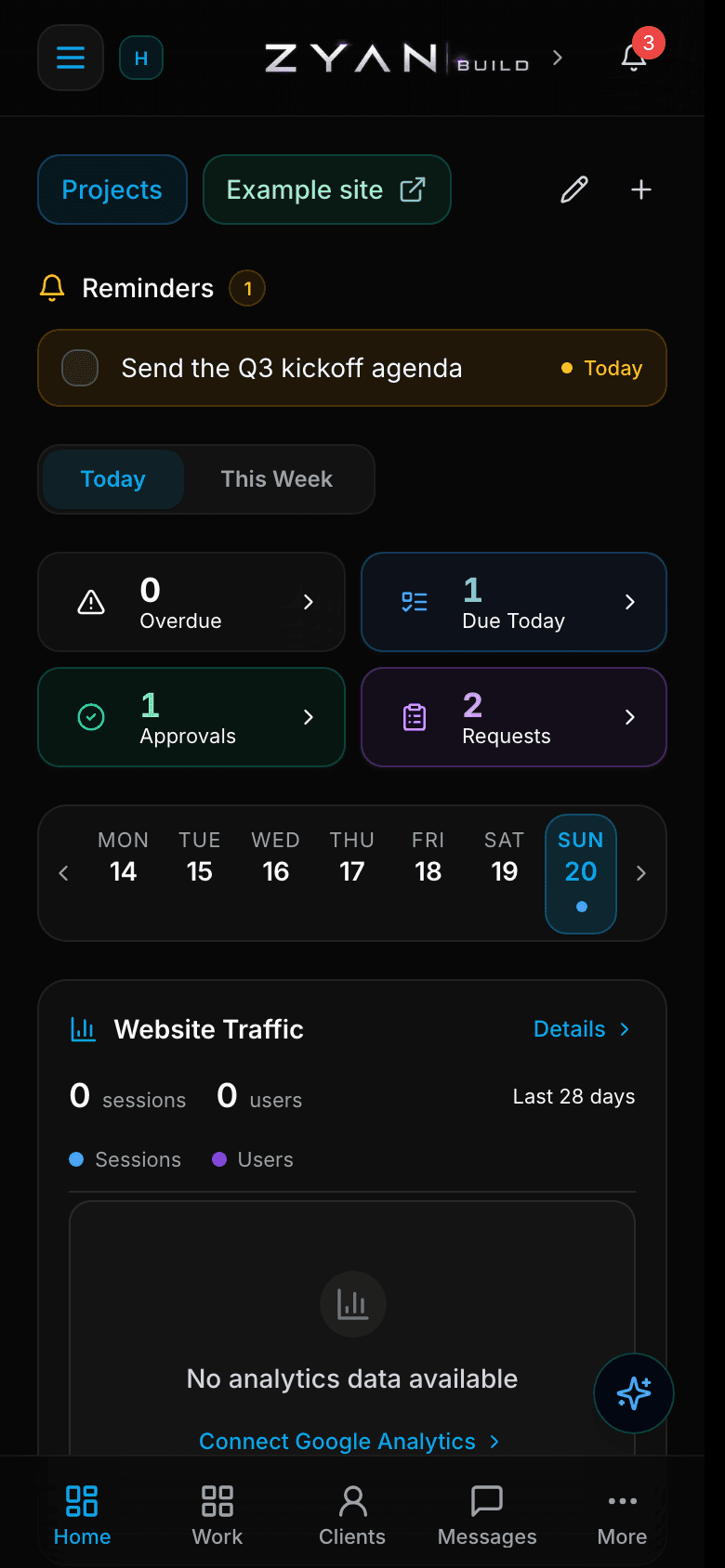
Rearrange your dashboard
Click Customize dashboard
Command CenterCustomize dashboard. Every widget gains a remove control and resize handles.
Drag to reorder
Move a card to where you actually look first.
Resize
Use the resize handles to change a card's width. Each widget has its own allowed widths.
Remove what you do not use
The × on a card takes it off the grid. Nothing is deleted — you can add it back from the drawer.
Add a widget
Customize dashboardAdd a widget opens the drawer with everything available to you.
Settings reference
| Setting | What it changes | Default |
|---|---|---|
| Customize dashboard | Enters edit mode — every widget gets a remove control and resize handles. | — |
| Add a widget | Opens the drawer of every widget available to you, grouped by category. | — |
| Reset dashboard to default? | Restores the default layout for your role. Your customisations are lost. | — |
Two widgets come and go on their own
Getting Started is temporary by design: once your workspace passes its setup window it leaves the grid and the Add-widget drawer for good, finished or not. Ad Spend is hidden inside the iOS admin shell because it links to a web-only page. Neither is a fault.
Widget reference — owner grid
| Widget | What it shows | Availability |
|---|---|---|
| Getting Started | First-run checklist: branding, client portal, team invites, integrations | Owner, and only while the setup window is open |
| This Week | Weekly summary of tasks, leads, revenue, projects, requests and messages | Owner grid |
| Quick Links | Shortcut bar to frequently-used portal pages | Everyone |
| Reminders | Your upcoming and overdue personal reminders | Everyone |
| Check-ins | Check-in lists and goals assigned to you, with this period's progress | Everyone |
| Time Clock | Clock in and out | Team members — hidden for the owner |
| Alert Bar | Overdue tasks, due-today tasks, pending approvals and requests at a glance | Owner grid |
| Week Strip | Scrollable week-at-a-glance calendar strip | Needs task viewing |
| Today's Agenda | Tasks and meetings scheduled for the selected day | Needs task viewing |
| Analytics Chart | Google Analytics sessions and users trend | Owner grid |
| Activity Feed | Chronological feed of team activity across the workspace | Owner grid |
| Agency Pulse | Commits, revenue, open requests and new leads with week, month and year trends | Owner grid |
| Revenue & Finance | Active, maintenance and plan revenue plus a QuickBooks summary | Owner only |
| QuickBooks Cash | Net profit at a glance, with a revenue and expense breakdown | Owner only |
| Project Mix | Donut breakdown of active, maintenance and completed projects | Needs project viewing |
| Active Projects | Preview list of active projects with progress and next checkpoint | Needs project viewing |
| Leads Pipeline | Hot, warm and cold lead counts and upcoming follow-ups | Needs lead access |
| Messages & Approvals | Recent message threads and pending approvals | Owner grid |
| Revision Requests | Recent client revision requests | Needs request viewing |
| Upcoming Meetings | Your next scheduled and live team meetings | Owner, or members who can view meetings |
| Team Pulse | Who is active and scheduled today, hours this week, open work and the team roster | Owner grid |
| Ad Spend | Last 30 days of ad spend and the Google and Meta split | Owner only, hidden in the iOS admin shell |
Widget reference — member home
| Widget | What it shows |
|---|---|
| My Week | Due, review, completed and projects-touched counts for your week |
| Focus Workspace | Your most recent project with completion, links and next task |
| Needs Attention | Blocked and overdue tasks, open requests and recent comments |
| My Projects | Your assigned active projects with progress and quick links |
| My Tasks | Your tasks grouped by blocked, due soon, in progress and open |
| Recent Comments | Latest comments on tasks assigned to you |
| Project Requests | Client revision requests on your assigned projects |
| Pay Summary | Your base pay, pending statement and last payout at a glance |
Reading Agency Pulse
Agency Pulse has its own Week / Month / Year selector, which changes the comparison window for every metric and its sparkline. Its cells say three different things when they have nothing to show, and the difference matters:
| Cell reads | Meaning |
|---|---|
| No access | You do not have the permission behind that metric |
| Not connected | The integration it needs — usually QuickBooks — is not linked |
| Unavailable | The fetch failed. Reload before assuming the number is zero |
The same honesty applies across the grid: a widget you lack permission for renders a No access cell rather than quietly disappearing, so you can tell a permission problem from an empty week.
The finance widgets are opt-in
Agency Pulse, QuickBooks Cash and Revenue & Finance are not in the default layout. Add them from the drawer. QuickBooks Cash says "QuickBooks isn't connected yet" rather than showing zeros — connect it under SettingsIntegrationsQuickBooks.
Troubleshooting
| Symptom | Cause | Fix |
|---|---|---|
| Getting Started disappeared | The workspace setup window closed — it leaves the grid and the drawer permanently | Nothing to fix. The checklist items live in Settings and the relevant pages |
| A widget shows No access | You lack the permission behind it | Ask the owner for the permission, or remove the widget |
| QuickBooks Cash shows "QuickBooks isn't connected yet" | No QuickBooks connection | The owner connects it under Settings → Integrations |
| Ad Spend is missing on your phone | It is hidden in the iOS admin shell because it links to a web-only page | Open it in a browser or the desktop app |
| Time Clock is not offered | It is hidden for the workspace owner | Nothing to fix — it is a team-member widget |
| Your layout looks nothing like a colleague's | Layout is saved per user, and owner grid and member home are different widget sets | Expected. Use Reset dashboard to default? for a clean start |
| A widget cell reads Unavailable | The underlying fetch failed | Reload the page before treating the number as zero |
In this section
Connect Google, pick your GA4 properties, and read traffic for one site or all of them.
SalesPipeline board, deals grid and the commission projection behind them.
Reports clients seePortal analytics and the SEO reports that land on a client dashboard.